
Tracking Shipments
Public Tracking Pages
Share live shipment tracking with customers, partners, and external parties — no login required.
4 min readLast updated
Goal
Share a live view of a shipment with someone outside your organization (a customer, receiver, or freight partner) without giving them an account, and control exactly how much they see.
Before you start
- Admin or Owner role, to turn public pages on and choose what they expose.
- A live shipment. Only validated, in transit, arrived, and in warehouse shipments are publicly visible. Drafts, shipments awaiting approval, and archived ones are not.
- A decision about disclosure. Everything is off by default, and prices are never shared. Read the toggle table below before enabling.
Enabling Public Tracking
Public tracking is configured per organization:
- Go to Settings
- Under Public Status Page, toggle Enable public status pages on
- Four further controls appear, each off by default:
| Toggle | What it adds to the page |
|---|---|
| Share documents | Download links for the document types you tick — Transport Documents (Bill of Lading, AWB), Packing Lists, Invoices, Phytosanitary Certificates, Certificates of Origin, Warehouse Receipts, Quality Inspection Reports (QC), and Courier Waybills (DHL, FedEx, UPS) |
| Share packing details | The full packing table — varieties, calibres, box counts, weights. Prices are never shared publicly, whatever else you enable |
| Share QC summary | The quality grade and the inspector’s remarks |
| Share QC inspection documents | The detailed inspection table with per-pallet scores, recommendations, and defects. Photos are not shared |
Everything saves the moment you toggle it. Once enabled, every live shipment gets a public tracking URL that you can share.
QC summary and QC inspection documents are separate switches. The summary is one grade and a sentence of remarks; the inspection documents are the pallet-by-pallet breakdown. It is perfectly reasonable to share the grade and leave out the detail.
What Visitors See
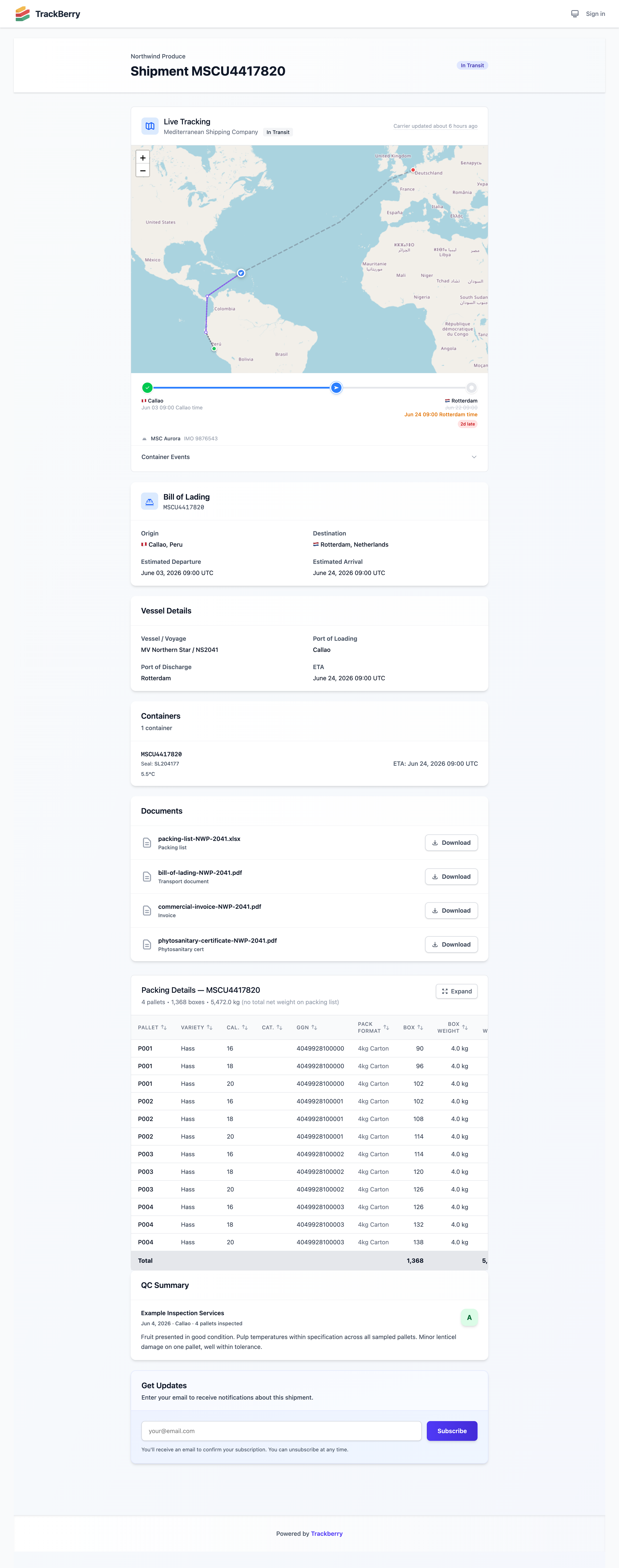
The public tracking page at /track/your-org/shipments/:id shows:
- Organization name and shipment reference
- Status badge — Current shipment status (In Transit, Arrived, In Warehouse, etc.)
- Live tracking map — Interactive map with route and position. It is the same tracking card signed-in members see, including the route timeline, progress bar and event timeline
- Transport details — Origin, destination, ETD, ETA, transport reference, carrier, vessel/flight
- Containers — Container numbers, seal numbers, individual ETAs, and cargo type badges (❄️ for frozen)
- Shared documents — Download links for selected document types
- Packing details — Produce types, varieties, calibres, pallet/box counts, weights, and organic (🌿) / GGN indicators when present
- QC inspection table — Per-pallet scores, recommendations, and defects, when enabled
- QC summary — Inspection company, date, quality grade, and remarks, when enabled
The tracking card is built from the same template as the internal one, so the map, route and freshness information always match the shipment page. The only difference is that the Check now button is left out, because it is for signed-in members only. See Container Tracking.
Only live shipments are visible publicly — validated, in transit, arrived, or in warehouse. Drafts and shipments waiting for approval are not accessible, and neither are archived ones.
Email Subscriptions
Visitors can subscribe to shipment updates without creating a Trackberry account:
- On the public tracking page, enter an email address in the Get Updates form
- A confirmation email is sent to verify the address
- Click the confirmation link in the email
- From then on, the subscriber receives email updates when:
- The shipment status changes
- The ETA is revised
- The transport reference is updated
Each notification email includes an unsubscribe link to stop receiving updates.
Sharing the Link
You can share the public tracking URL directly with anyone. The URL format is:
https://trackberry.com/track/your-org-slug/shipments/123
Tip: Signed-in members who visit the public tracking URL are automatically redirected to the full internal shipment view (if they have that preference enabled in their settings).
Access Control
- Public tracking pages only work when Enable public status pages is turned on in organization settings
- Admins control which document types and data sections are visible
- No authentication is required to view the page or subscribe to updates
- Private shipment data (prices, quality checks, monitoring alerts, audit logs, internal notes) is never exposed on the public page. Prices are excluded from the packing table, and inspection photos from the QC table, even when those sections are shared