
Smarter labels, richer filters and shipment notes
Here’s a quick update on what we’ve released this week:
❄️ Frozen produce — containers with frozen goods now show a small snowflake icon, so you can spot them at a glance. We read the container’s set temperature from the B/L or AWB.
🌿 Organic produce — we now show a small leaf icon when a container holds organic produce, and a full-size leaf when it’s 100% organic.
📋 GGN support — we’re now reading GlobalGAP Numbers directly out of packing lists, and they’ll be exportable to your ERP. We don’t look up GGNs yet, and we’ll wait until there’s clear interest before we do. The most useful case would be automated certification checks: we could alert importers whenever a producer’s certificate is about to expire or has lapsed.
📝 Shipment notes — anyone on your team can now leave a note on a shipment. It’s a simple free-text field that everyone can see. Use it for anything that doesn’t fit neatly into a structured field, such as a delay, a special instruction or a warning for the rest of the team.
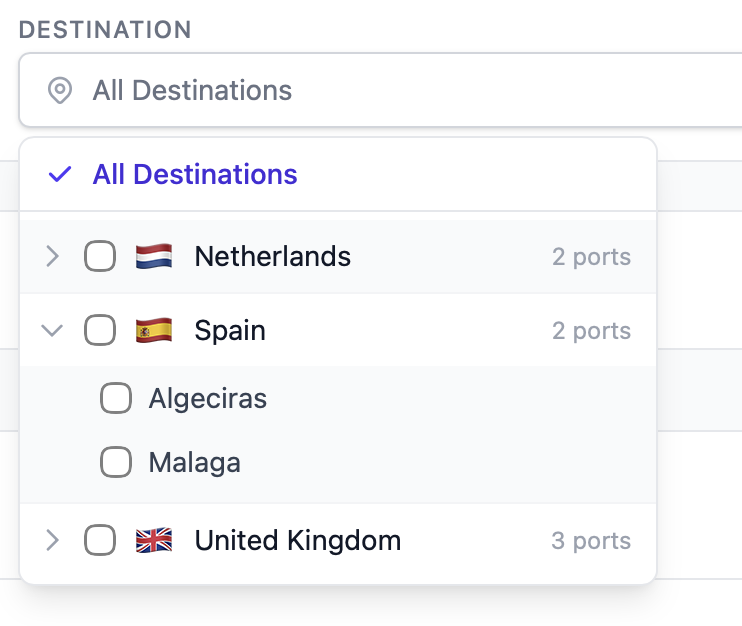
🌍 Destination filter — the destination dropdown in the Dashboard and Trading View has been replaced with a smarter filter. You can now filter by country, then drill down to specific ports within that country. Country flags make the list quick to scan.
Related updates
- Choose which filters appear on your dashboard 18 June 2026